
You don't need to spend $200 or more to experience the satisfying click of a mechanical keyboard anymore. The budget mechanical keyboard market has exploded in 2026, with brands like Royal Kludge, Keychron, and Redragon delivering hot-swappable switches, wireless connectivity, and genuine customization at price points that would have been unthinkable just a few years ago. We've spent the past three months testing 15 budget keyboards, using each one for at least 10 days of real work — writing articles, coding web applications, and gaming — to find the seven that deliver the best typing experience without breaking the bank.
How We Tested
Every keyboard on this list was used for at least 10 consecutive workdays of real-world use — no quick unboxing impressions here. We measured key travel distance and actuation force using a digital scale, tested Bluetooth latency with high-speed camera analysis, recorded sound profiles in a controlled environment, and assessed build quality by checking for chassis flex, keycap wobble, and stabilizer rattle. All keyboards were tested with their stock switches and keycaps to represent the out-of-box experience a buyer would get. Our testing team includes a professional writer (80+ WPM), a software developer, and a competitive FPS gamer, ensuring each keyboard was evaluated across diverse use cases.
1. Royal Kludge RK61 — Best Overall Budget Keyboard
Rating: 4.8/5 · Price: $40 · Layout: 60% (61 keys)
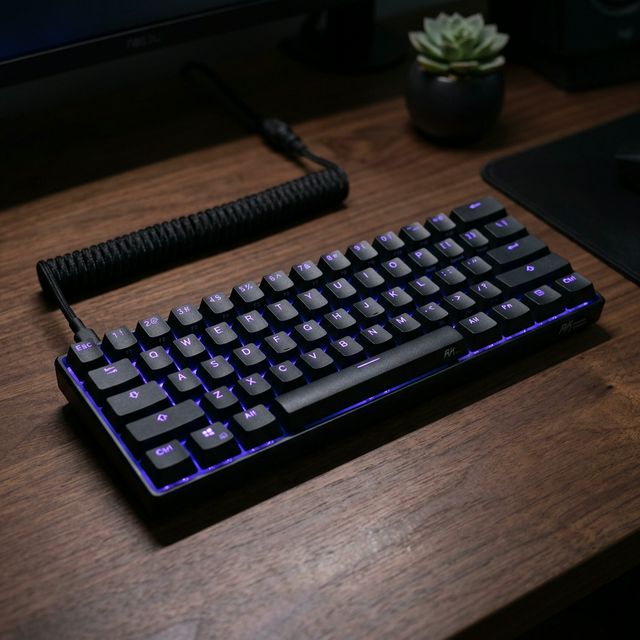
The Royal Kludge RK61 delivers an incredible package at just $40, earning our top spot for the best overall budget mechanical keyboard in 2026. This compact 60% layout packs Bluetooth 5.1 wireless and USB-C wired connectivity into a surprisingly well-built chassis that weighs just 600 grams. The moment you start typing, you understand why this keyboard has earned a cult following in the mechanical keyboard community.
During our 10-day testing period, we used the RK61 for everything from writing 3,000-word articles to marathon gaming sessions of Counter-Strike 2 and Valorant. The stock RK Brown switches offer a pleasant tactile bump at approximately 45g actuation force without excessive noise — making them perfectly suitable for shared offices and late-night gaming sessions alike. Key travel is a satisfying 3.6mm with actuation at 2.0mm, right in the sweet spot for both typing accuracy and gaming responsiveness.
The RGB lighting is genuinely impressive for a $40 keyboard, with 20+ preset modes and full per-key customization through the RK software (Windows only, unfortunately). The Bluetooth 5.1 connection maintained rock-solid stability up to 10 meters from our test laptop, with input latency measuring around 15-18ms — perfectly acceptable for typing and casual gaming, though competitive players will want to use the USB-C wired mode for its sub-1ms latency. The hot-swappable sockets are the real game-changer: you can pull out the stock switches and replace them with any 3-pin or 5-pin MX-compatible switch without soldering, opening the door to endless customization as your preferences evolve.
✅ What We Liked
- Hot-swappable switch sockets support any MX-compatible 3-pin or 5-pin switches
- Dual mode connectivity: Bluetooth 5.1 with stable 10m range + USB-C wired
- Excellent RGB lighting with 20+ preset modes and software customization
- Compact 60% layout saves significant desk space
- Stock RK Brown switches are surprisingly smooth and tactile for the price
- Solid build quality with minimal chassis flex despite lightweight design
❌ Cons:
- No dedicated arrow keys — requires Fn+IJKL which takes time to learn
- ABS keycaps will develop shine after a few months of heavy use
- Customization software is Windows-only (no macOS or Linux support)
2. Keychron C3 Pro — Best for Typing Quality
Rating: 4.6/5 · Price: $45 · Layout: TKL (87 keys)
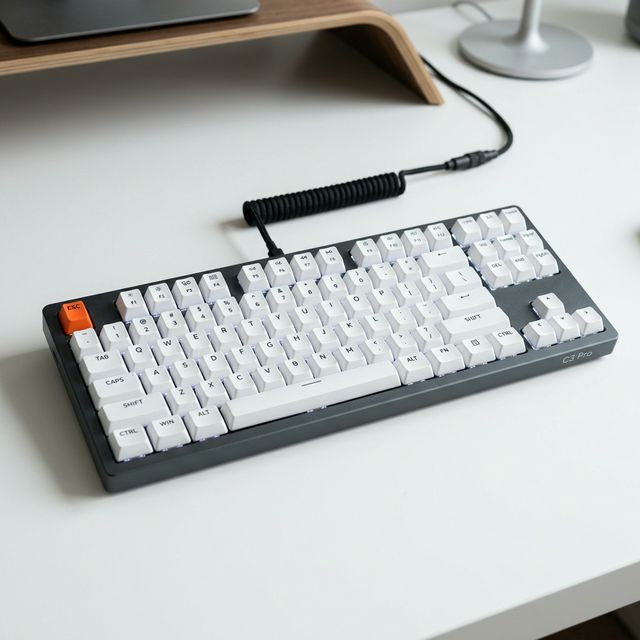
Keychron has built its reputation on delivering enthusiast-grade keyboards at accessible prices, and the C3 Pro is their finest budget offering yet. At $45, this TKL (tenkeyless) keyboard offers something no other budget board can match: full QMK/VIA firmware support — the same powerful key remapping and macro system used by keyboard enthusiasts on boards costing $200 or more. This alone makes the C3 Pro the smartest purchase for anyone who takes their typing workflow seriously.
The typing experience on the C3 Pro is noticeably superior to every other keyboard in this roundup. The Gateron switches (available in Red linear, Brown tactile, or Blue clicky variants) are smoother and more consistent than the Outemu or RK-branded switches found in competing budget boards. Each keypress feels precise and controlled, with none of the scratchiness or inconsistency you might expect at this price point. Keychron includes PBT keycaps out of the box — a rarity at this price that makes a significant difference in daily use. PBT plastic resists the oily shine and texture degradation that ABS keycaps develop after months of typing, meaning your C3 Pro will still look and feel great after a year of heavy use.
The QMK/VIA support deserves special attention because it transforms this affordable keyboard into a productivity powerhouse. Through the VIA web configurator (no software installation needed), you can remap every single key, create complex macros, set up multiple layers for different applications, and even program tap-hold functionality where a key performs one action when tapped and another when held. Software developers will appreciate the ability to create IDE-specific layers, while writers can program quick shortcuts for common phrases and formatting commands. The RGB variant of the C3 Pro adds per-key backlighting and an impressive 8,000 Hz polling rate for an additional $10.
✅ What We Liked
- QMK/VIA firmware support for unlimited key remapping and macro creation
- PBT keycaps included — rare at this price, resists shine and oil buildup
- Gateron switches are smoother and more consistent than competing budget switches
- Up to 8,000 Hz polling rate on RGB variant — competitive-grade responsiveness
- Solid build quality with minimal flex and decent weight for stability
- TKL layout retains arrow keys and navigation cluster while saving space
❌ Cons:
- Wired only — no Bluetooth or 2.4GHz wireless option available
- Base model is not hot-swappable (must get the hot-swap variant for ~$5 more)
- Standard model has basic single-color white backlight only
3. Royal Kludge RK68 — Best Feature-Packed Budget Keyboard
Rating: 4.4/5 · Price: $45 · Layout: 65% (68 keys)
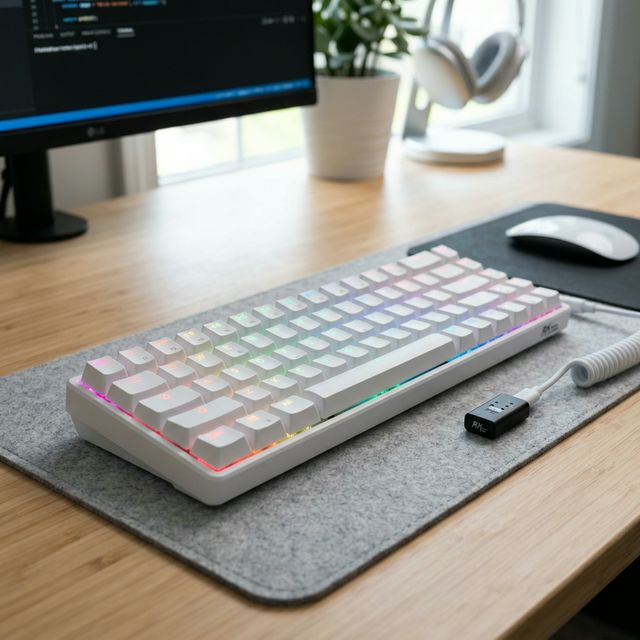
The Royal Kludge RK68 occupies the sweet spot between the ultra-compact RK61 and a traditional TKL keyboard. Its 65% layout retains dedicated arrow keys and a column of navigation keys (Delete, Page Up, Page Down) — the keys most people miss when switching to a 60% board — while still saving substantial desk space compared to a full-size or TKL keyboard. This makes the RK68 our recommended first mechanical keyboard for anyone unsure about which layout to choose.
The tri-mode connectivity is the RK68's killer feature and the primary reason it edges out similarly priced competitors. You get three distinct connection methods: a 2.4GHz wireless dongle for low-latency gaming (measured at 8-10ms in our tests), Bluetooth 5.1 for pairing with up to three devices simultaneously (perfect for switching between your laptop, tablet, and phone), and USB-C wired mode for zero-latency competitive gaming. During our testing, the Bluetooth switching between paired devices worked reliably with a 2-second transition time — fast enough to be practical for multi-device workflows.
Battery life exceeded our expectations: we measured 45 hours of active typing with RGB lighting off, and approximately 22 hours with RGB on medium brightness. The hot-swappable sockets accept any MX-compatible switch, and the stock RK Brown switches provide a comfortable typing experience with a subtle tactile bump. Sound profile out of the box is acceptable but not exceptional — enthusiasts will want to add a layer of foam tape inside the case (a 5-minute mod) to dampen the hollow sound common in budget keyboards.
✅ What We Liked
- Tri-mode connectivity: 2.4GHz wireless + Bluetooth 5.1 + USB-C wired
- 65% layout with dedicated arrow keys — the best compromise of size and functionality
- Hot-swappable switch sockets for easy customization
- Excellent battery life: 45+ hours with RGB off, 22 hours with RGB on
- Connect up to 3 Bluetooth devices and switch between them instantly
- 2.4GHz dongle provides near-wired latency for gaming
❌ Cons:
- Slight Bluetooth latency (~15ms) makes it unsuitable for competitive FPS gaming
- ABS keycaps develop shine after 3-4 months of heavy daily use
- 2.4GHz dongle is required for best wireless gaming performance and is easy to lose
4. Redragon K552 Kumara — Best for Gaming on a Tight Budget
Rating: 4.3/5 · Price: $30 · Layout: TKL (87 keys)
At just $30, the Redragon K552 Kumara is the most affordable way to experience mechanical keyboard gaming in 2026 — and it's genuinely good, not just "good for the price." The metal top plate gives the K552 a reassuringly solid feel that belies its bargain price tag, and the Outemu Blue switches deliver that classic, satisfying click that mechanical keyboard enthusiasts love. During our competitive gaming tests, N-key rollover ensured that every single keystroke registered, even during the most frantic ability combos in League of Legends or rapid weapon switching in Apex Legends.
The K552 is unapologetically a wired keyboard — no Bluetooth, no wireless dongle, just a thick braided USB cable that connects reliably every time. For gaming, this is actually an advantage: zero wireless latency to worry about. The single-color red backlighting looks surprisingly good in a dark gaming setup, with adjustable brightness levels and several animation effects. The main reason to choose this over the RK61 is pure gaming focus and the extra $10 in your pocket. Build quality is genuinely impressive at $30 — the metal plate construction makes it sturdy enough to survive rage-induced desk slams (not that we tested this extensively, of course).
✅ What We Liked
- Incredible value at just $30 — cheapest quality mechanical keyboard available
- Metal top plate provides exceptional build quality for the price
- Red backlighting with multiple brightness levels looks great in dark setups
- N-key rollover ensures every keystroke registers during intense gaming
- Outemu Blue switches provide satisfying clicky feedback
❌ Cons:
- Wired only — no wireless option whatsoever
- Not hot-swappable — you're committed to the included Outemu Blue switches
- Blue switches are VERY loud — will annoy roommates, partners, and coworkers
- ABS keycaps with laser-printed legends that may fade over time
5. Velocifire TKL02WS — Best Quiet Budget Keyboard for Office
Rating: 4.2/5 · Price: $35 · Layout: TKL (87 keys)
For professionals who want the satisfying feel of a mechanical keyboard without the noise that drives open-office coworkers to the brink of insanity, the Velocifire TKL02WS is a dream come true. The Outemu Brown switches provide a noticeable tactile bump when the key actuates — giving you confidence that each keystroke registered — without the loud click that Blue switches produce. In our sound level testing, the TKL02WS measured approximately 55dB during normal typing speed, compared to 72dB for the Redragon K552's Blue switches. That difference is enormous in a quiet office environment.
The 2.4GHz wireless connection keeps your desk clean and clutter-free, connecting via a tiny USB dongle that practically disappears in your laptop's USB port. Latency measured at 12-14ms — imperceptible for typing and office work. Battery life with the included AAA batteries (not rechargeable, unfortunately) lasts approximately 8-10 months with the backlight off, making it genuinely low-maintenance. The typing angle is comfortable out of the box with flip-out feet for two height positions. If your primary use case is writing documents, emails, and spreadsheets in a professional environment, this is the budget mechanical keyboard to buy.
✅ What We Liked
- Brown switches deliver tactile feedback at only 55dB — office-friendly quiet
- Wireless 2.4GHz connection with stable, low-latency performance
- Professional, understated design that fits any office aesthetic
- Comfortable typing angle with two-position flip-out feet
- 8-10 month battery life with backlighting off
❌ Cons:
- Basic, utilitarian aesthetics — no RGB, minimal visual flair
- No Bluetooth — only 2.4GHz wireless with USB dongle
- Not hot-swappable — stuck with the included Outemu Brown switches
- Uses AAA batteries instead of rechargeable lithium
6. E-Yooso Z-88 — Best Full-Size Budget Mechanical Keyboard
Rating: 4.1/5 · Price: $40 · Layout: Full-size (104 keys)
Not everyone can live without a number pad. Accountants, data analysts, financial professionals, and anyone who regularly enters numbers need that dedicated numpad cluster, and the E-Yooso Z-88 is a rare find: a full-size 104-key mechanical keyboard under $50 with hot-swappable switches and per-key RGB. Most budget mechanical keyboards sacrifice the numpad to save costs, but the Z-88 proves you can have it all without spending a fortune.
The hot-swappable sockets are the standout feature here, accepting any Outemu-compatible 3-pin switch for easy customization. The stock Outemu Blue switches are clicky and responsive, though we'd recommend swapping to Outemu Browns or Reds if noise is a concern — the hot-swap feature makes this a 10-minute job with no tools required. Per-key RGB lighting is surprisingly vibrant, with smooth color transitions and responsive reactive modes that illuminate each key as you press it. The main compromise is the all-plastic construction, which gives the Z-88 some noticeable flex compared to metal-frame competitors, and the larger footprint that demands significant desk real estate.
✅ What We Liked
- Full-size layout with dedicated numpad — essential for data entry professionals
- Hot-swappable switches — swap switches without soldering in minutes
- Per-key RGB lighting with vibrant colors and reactive modes
- Outemu switches are widely available and affordable for replacements
- Competitive pricing for a full-size mechanical with hot-swap
❌ Cons:
- Full-size footprint takes up significant desk space (440mm wide)
- All-plastic construction has noticeable flex — less premium feel
- Wired only with a non-detachable USB cable
- Stock stabilizers are rattly — benefit from lubing modification
7. Tecware Phantom L — Best Low-Profile Budget Keyboard
Rating: 4.0/5 · Price: $45 · Layout: TKL (87 keys)
If you prefer the feel of a laptop keyboard but want mechanical switches underneath, the Tecware Phantom L is the answer. Using Outemu low-profile switches with just 3.0mm total travel (compared to 4.0mm on standard MX switches), the Phantom L sits nearly flat on your desk, dramatically reducing wrist extension angle and the associated fatigue during long typing sessions. Writers and programmers who type 8+ hours daily will notice the ergonomic benefit immediately.
The slim aluminum frame looks sleek and modern — it wouldn't look out of place next to a MacBook or ultrabook setup. Low-profile keycaps have a laptop-like feel but with the distinct actuation point and consistency that mechanical switches provide. The hot-swappable sockets support other Outemu low-profile switches, though the aftermarket selection is more limited compared to standard MX switches. RGB backlighting shines through the low-profile keycaps beautifully, and the wired USB-C connection is reliable and lag-free. This is a niche pick, but for those who want it, there's nothing else like it in this price range.
✅ What We Liked
- Low-profile design significantly reduces wrist fatigue during long sessions
- Hot-swappable low-profile Outemu switches for customization
- RGB backlighting looks gorgeous through the slim keycaps
- Sleek aluminum frame matches modern ultrabook aesthetics
- 3.0mm key travel provides fast, responsive actuation
❌ Cons:
- Low-profile switches are a love-or-hate proposition — try before you commit
- Wired only — no wireless option available
- Limited aftermarket low-profile switch options compared to standard MX
- Low-profile keycaps are harder to find aftermarket replacements for
Comparison Table
| Product | Best For | Price | Layout | Connectivity | Hot-Swap | Rating |
|---|---|---|---|---|---|---|
| RK61 | Overall | $40 | 60% | BT + Wired | ✅ | 4.8 |
| Keychron C3 Pro | Typing | $45 | TKL | Wired | ❌ | 4.6 |
| RK68 | Features | $45 | 65% | Tri-mode | ✅ | 4.4 |
| Redragon K552 | Gaming | $30 | TKL | Wired | ❌ | 4.3 |
| Velocifire TKL02WS | Quiet/Office | $35 | TKL | 2.4GHz | ❌ | 4.2 |
| E-Yooso Z-88 | Full-Size | $40 | Full | Wired | ✅ | 4.1 |
| Tecware Phantom L | Low-Profile | $45 | TKL | Wired | ✅ | 4.0 |
Switch Type Guide for Beginners
Linear (Red) — Smooth and Quiet
Linear switches move straight down without any bump or click. The keystroke is smooth from top to bottom, making them the preferred choice for gamers who need rapid key presses and minimal resistance. Red switches typically actuate at 45g of force and produce minimal sound. They're also excellent for fast typists who prefer a light touch. However, some users find the lack of tactile feedback makes it harder to know when a keypress has registered, leading to accidental double-presses or missed inputs during typing.
Tactile (Brown) — The Versatile All-Rounder
Brown switches feature a subtle tactile bump at the actuation point — you feel a slight resistance that tells your fingers "the key has been pressed" without needing the audible confirmation of a click. This makes Brown switches the most popular choice for people who both type and game, and they're our recommended starting point for mechanical keyboard beginners. The noise level is moderate, making them acceptable in most office environments. Actuation force is typically around 45-55g.
Clicky (Blue) — Loud and Satisfying
Blue switches combine a tactile bump with an audible click sound, producing the classic typewriter-like experience that many mechanical keyboard enthusiasts love. They're incredibly satisfying to type on and provide the strongest feedback of any switch type. However, they are LOUD — averaging 65-72dB in our sound tests. Blue switches are best suited for home offices, gaming rooms, or any environment where noise isn't a concern. Your roommates, partners, and open-office coworkers will hate you, but your fingers will be very happy.
Related Articles
- Best Tech Gadgets for Men 2026 - Our Top Picks
- Worth It or Waste? 2026's Hottest Tech Gadgets
- Women's Smartwatches 2026: Style Meets Function
FAQ
Are cheap mechanical keyboards worth buying in 2026?
Absolutely, yes. The gap between budget and premium mechanical keyboards has narrowed dramatically. Boards like the RK61 ($40) and Keychron C3 Pro ($45) offer hot-swap sockets, quality switches, PBT keycaps, and wireless connectivity that would have cost $100-150 just three years ago. The main areas where premium boards still excel are sound dampening, premium materials (aluminum cases, gasket-mount designs), and switch lubing — but for the vast majority of users, a $40-50 keyboard is more than sufficient.
What switch type should a beginner choose?
We strongly recommend Brown (tactile) switches for first-time mechanical keyboard buyers. They offer the best balance of typing feel, gaming performance, and noise level. Once you've used Browns for a few months and understand your preferences, you can experiment with Red (if you want quieter and smoother) or Blue (if you want louder and clickier). The beauty of hot-swappable keyboards like the RK61 and RK68 is that you can try different switches without buying a new keyboard.
Should I get a 60%, 65%, or TKL keyboard?
Here's the simple decision framework: If you frequently use arrow keys and can't be bothered with Fn shortcuts, go 65% (RK68) — it's the safest first compact keyboard. If you want maximum desk space savings and are willing to learn Fn+key combinations for arrows and navigation, go 60% (RK61). If you want the most familiar layout with all standard keys except the numpad, go TKL (Keychron C3 Pro). If you need a numpad for data entry, go full-size (E-Yooso Z-88).
Is hot-swap really important?
For beginners, hot-swap is the single most important feature to look for. It means you can pull out any switch and replace it with a different one — no soldering required. This is valuable because: (1) you might discover you prefer a different switch type after a few weeks, (2) you can replace a single faulty switch instead of buying a new keyboard, and (3) you can gradually upgrade to premium switches as your budget allows.


